Software for outdoor design-build contractors

The system that runs two design-build firms.

ContractorIQ takes a lead from the first call to the completed job with the money attached at every step: a closing percentage on every lead, a cost on every estimate line, gross profit on every job. It has run Install-It-Direct in San Diego and Sequoia Outdoor on the SF Peninsula since 2017. It is now licensed to a small number of firms like them.

iid.contractoriq.io/projects/working
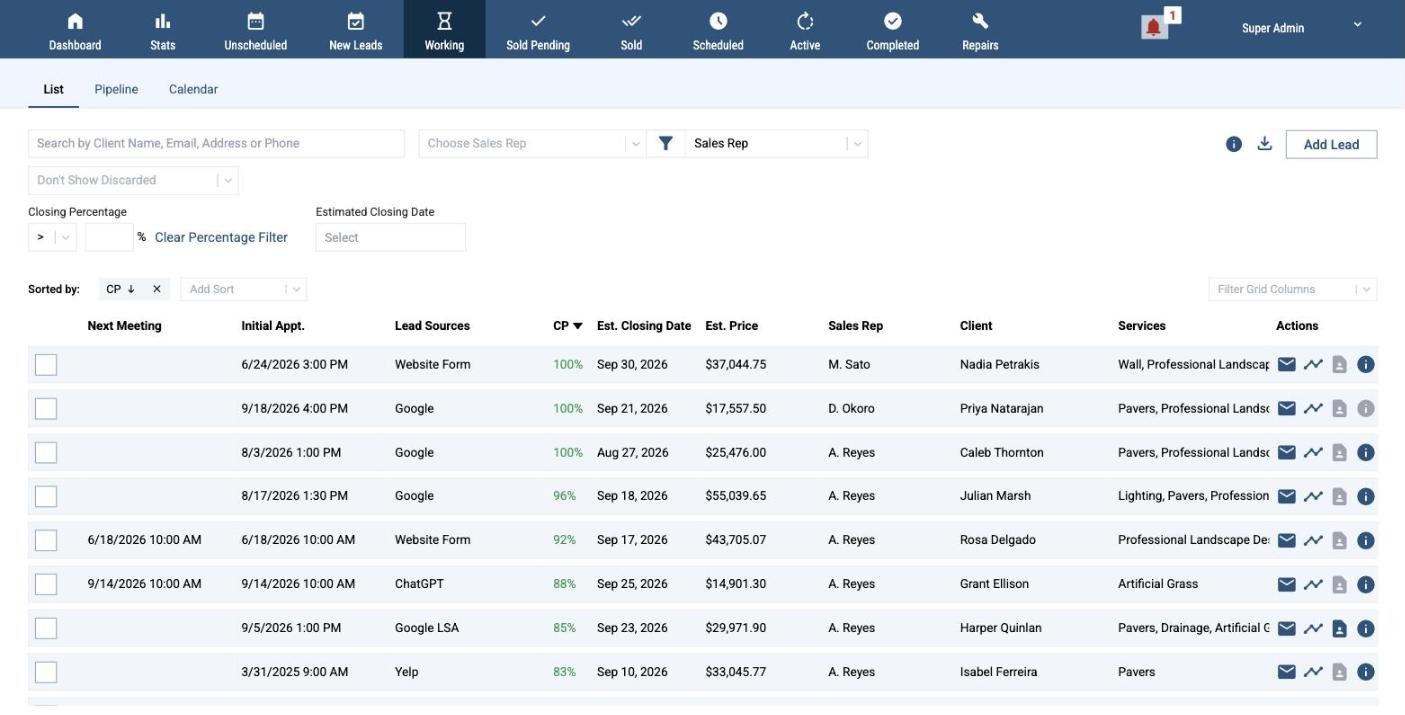
ContractorIQ Working tab: leads with closing percentage, estimated close date, estimated price, sales rep, client and services

The Working tab at Install-It-Direct, live. Client and staff names replaced.

Proof

Not a demo. The live system behind two companies.

2
firms run on it
Install-It-Direct, San Diego, founded 2009. Sequoia Outdoor, SF Peninsula.
2017
in production since
Every lead and every job at both firms has run through it since.
56,000+
leads and projects tracked
49,457 at Install-It-Direct, 7,036 at Sequoia Outdoor.
4,000+
completed projects
Pavers, turf, hardscape, outdoor kitchens, pergolas, lighting, drainage.

Counts read from the two live ContractorIQ instances on September 21, 2026. The companies: installitdirect.com and sequoiaoutdoor.com.

Why it exists

Built by a contractor. Run on his own companies first.

I started Install-It-Direct in 2009. The software sold to contractors was built for service calls: a truck, a ticket, an invoice. A sixty-thousand-dollar backyard is a different business. It has a design, a permit, a product catalog, a crew, a schedule, and a margin that can disappear in the last week. The tools we tried did not carry the money through the job, so we built our own and ran the company on it. It has been the operating system for two firms since 2017. If you run a firm like ours, it will probably fit yours, and I can show you in thirty minutes.

Luke WhittakerFounder, ContractorIQ. Owner, Install-It-Direct. Co-owner, Sequoia Outdoor.

Under the hood

One system from the first call to the last check.

Six screens from the live instances. Client and staff names are replaced; one screen shows sample figures and says so.

Leads

A pipeline that forecasts.

Every working lead carries a closing percentage, an estimated close date and an estimated price, so the pipeline adds up to a forecast instead of a list. The lead source is recorded on day one and followed through to the signed job, so the source report shows which channels produce profit, not clicks.
Working
Working leads grid with closing percentage and estimated price
Estimates

Every line carries its cost.

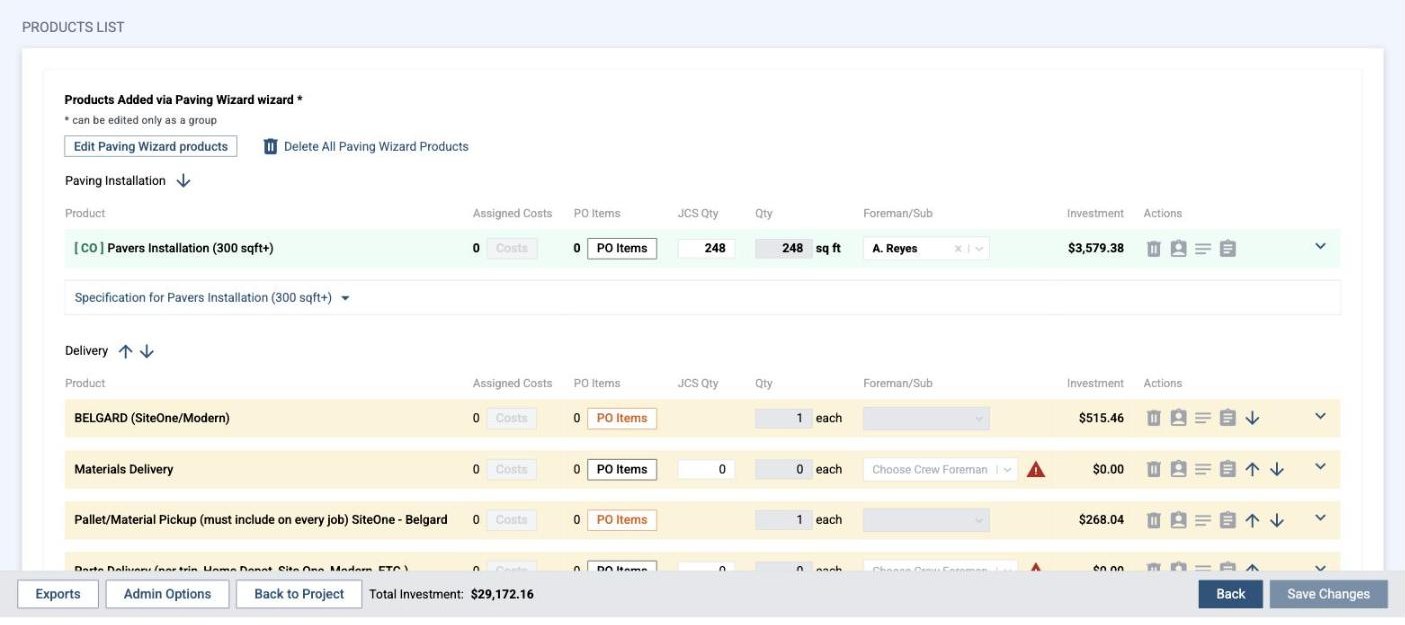
Estimates are built from your product catalog through wizards that bundle what belongs together, so the base, the delivery and the edge restraint are not left off a paver job. Each line carries its material and labor cost, its purchase-order items, the crew quantity and the foreman who will build it. Change orders amend the same lines.

Investment breakdown: products
Estimate line items with assigned costs, purchase order items, crew quantity, foreman and investment
Margin

Gross profit before the signature.

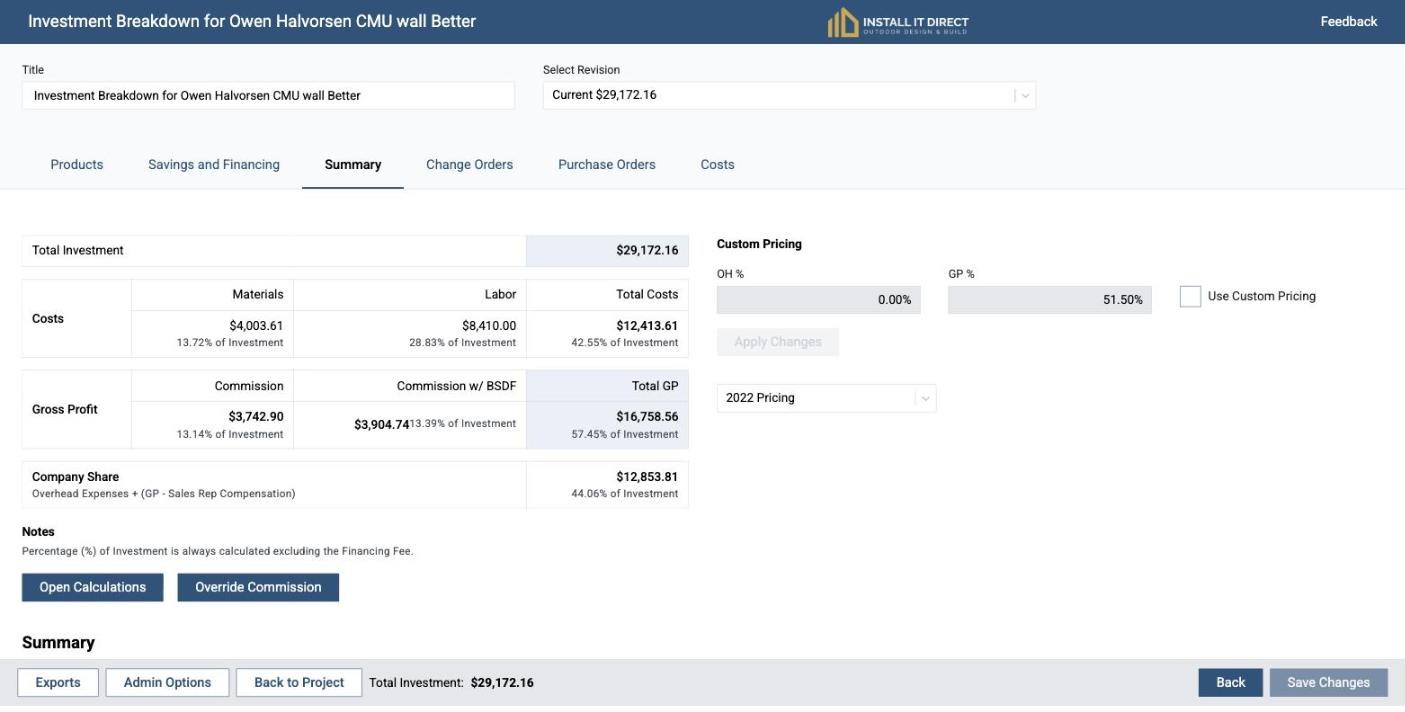
The summary computes materials, labor, commission and company share for every revision of every estimate. Pricing profiles set the floor. A thin job is visible before it is sold, not after it is built.

Investment breakdown: summary
Estimate summary showing total investment, material and labor costs, commission, gross profit and company share
Jobs

Progress, payments and margin on one row.

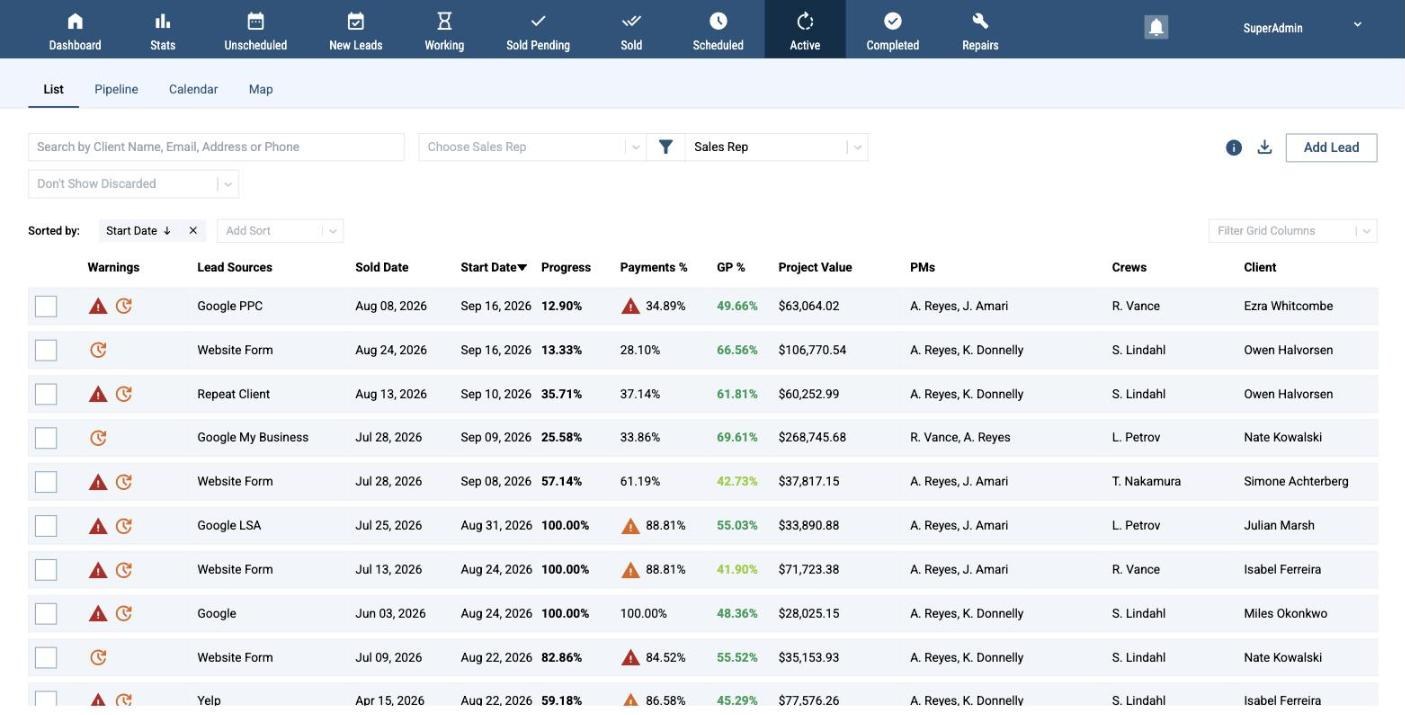
Active jobs show percent complete, percent collected and gross profit as the job moves, with the project managers and crews on each row. Warnings mark the jobs that need attention today.

Active
Active jobs grid with progress, payments percent, gross profit percent, project value, project managers, crews and client
Field

Checklists with photo evidence.

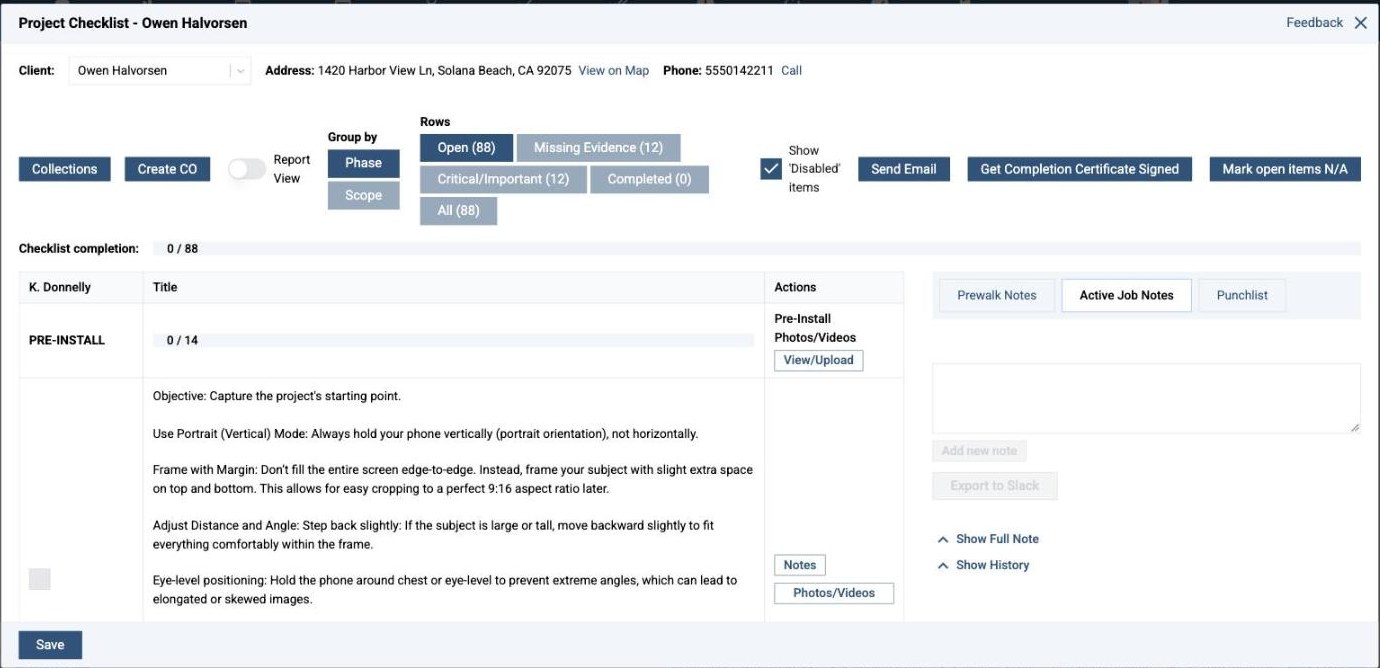
Each project runs a phase-by-phase checklist (88 items at Install-It-Direct) with photo and video evidence per step. Missing evidence is counted, not assumed. Pre-walk notes, active job notes, the punch list and change orders live on the same job.

Project checklist
Project checklist with 88 items grouped by phase, missing evidence count, pre-install photo instructions and job notes
People

Reps ranked on what closes.

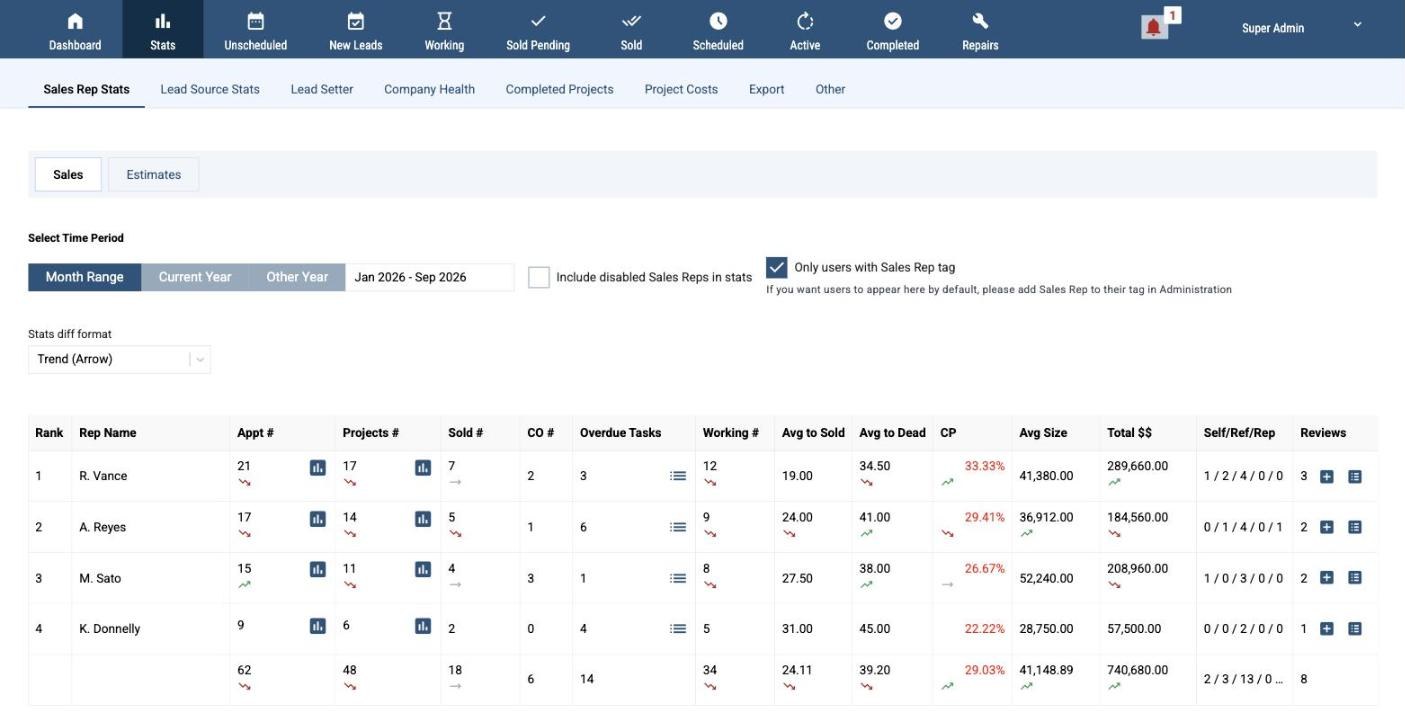
Appointments, projects, sold, closing percentage, days to sold, average job size and gross profit, per rep and per period, with the trend. Goals and quarterly bonuses are computed from the same numbers, so the comp plan is enforced by the software instead of a spreadsheet.

Stats: sales reps (sample figures)
Sales rep statistics table with appointments, projects, sold, closing percentage, days to sold, average size, total dollars and gross profit percent

Also under the hood

  • Appointment scheduling and a crew calendar
  • Lead source analytics from first click to signed job
  • Automated follow-up email until the lead books or closes
  • Pipeline from inquiry to completed job, plus repairs and maintenance
  • Proposals and presentation decks generated from the estimate
  • Product catalog with pricing profiles and bundling wizards
  • Purchase orders, sent in one click
  • DocuSign built in
  • One-click email templates
  • Completed-job map with before and after photos
  • Project management checklists with evidence
  • Collections tracking and forecasting
  • Crew pay and job cost sheets
  • Change orders
  • Slack project channels, created when a job sells
  • QuickBooks integration
  • Company health: cash, collections, expected gross profit
  • CSV export of any grid

Fit

Built for firms like ours.

For

Residential outdoor-living design-build: pavers, turf, hardscape, outdoor kitchens, pergolas, lighting, drainage. Sales reps who quote at the kitchen table. Crews or subs paid by the job. Roughly $1.5M to $8M a year.

Not for

Service-call businesses: HVAC, plumbing, maintenance routes, repairs billed by the hour. Jobber, ServiceTitan and Housecall Pro are built for that. ContractorIQ is built for the project business.

One rule

We do not license to firms competing with our own companies in San Diego County or on the San Francisco Peninsula. We are contractors first.

Licensing

How it works.

  1. A thirty-minute walkthrough

    A screen share of the live system with Luke. Bring your questions and one real job.

  2. Your own instance

    If it fits, you get yourcompany.contractoriq.io. We load your product catalog and pricing, import your open leads, and train your team on the screens above.

  3. Priced on the call

    Pricing is set with you once we know your size and what you need. Your data exports to CSV at any time.

Request a walkthrough

Thirty minutes, one real job.

Tell us what you run the business on today and what is not working. Luke replies himself, usually within a business day, with two or three times for a screen share.

One reply from Luke. Nothing else is sent.